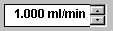
Control:
Edit Field
This control indicates the current value of a parameter. To enter a new value, either type the value directly into the edit field or select a value using the arrow keys. You may enter numerical values or defined states, such as Auto, On, Off, etc. In addition, you are free to show or hide the dimensions.
Select Properties on the context menu to change the appearance of the control.